

Introduction
One of the most crucial digital marketing tactics for companies in 2026 is Google Business Profile. Whether you run a small local shop, a restaurant, a law firm, a salon, a real estate company, or an online service business, your visibility on Google can determine how many customers discover your brand.
However, in a highly competitive online environment, local SEO is more important than ever. Consumers now rely heavily on Google Search and Google Maps to find nearby businesses, compare reviews, check opening hours, get directions, and make buying decisions. Investing in Google Business Profile increases a company’s chances of ranking highly in local search results, winning over clients, and producing steady leads.
The rise of mobile searches and voice search has also changed how people interact with businesses online. Millions of users now search phrases like “restaurants near me,” “best plumber in Lagos,” or “top hair salon nearby.” You risk losing important clients to rivals who are knowledgeable about Google Business Profile optimization if your company profile is not optimized.
A well-optimized Google Business Profile can greatly enhance:
- Calls from potential customers
- Website visits
- Local traffic
- Brand trust
- Customer engagement
- Sales and conversions
An investment in a Google Business Profile can improve a business’s Google Maps ranking, build credibility through reviews, and strengthen its local SEO strategy. This is why understanding how to optimize Google Business Profile is essential for every modern business owner.
This comprehensive guide will explain everything you need to know about Google Business Profile optimization in 2026, including how to create a profile, improve rankings, avoid common mistakes, and dominate local search results by employing local company marketing techniques.
What Is Google Business Profile?
Google offers a free business listing program called Google Business Profile. It gives companies control over how they appear on Google Maps and Search.
Although the platform has been renamed to Google Business Profile, many people still search for terms like Google My Business account, Google My Business optimization, and How do I register on Google My Business? For this reason, companies need to be familiar with both the old and new terminology.
A Google Business Profile assists companies in giving clients crucial information, such as:
- Business name
- Address
- Phone number
- Website
- Opening hours
- Customer reviews
- Photos and videos
- Products and services
- Directions
- Messaging options
Your profile may show up when someone searches for your company or associated services in:
- Google Search
- Google Maps
- The Local Pack
The Local Pack is the section of Google Search that displays local businesses with maps, reviews, and contact details. Businesses with strong Google Business Profile optimization usually perform better in this..
A company can connect with local clients who are actively needing goods or services by maintaining a Google Business Profile. This makes Google Maps SEO a powerful component of every local SEO strategy.
Google Business Profile optimization is especially useful for:
- Restaurants
- Hotels
- Retail stores
- Medical clinics
- Real estate agencies
- Freelancers
- Local service providers
- E-commerce businesses with physical locations
Google continues to prioritize local search experiences. Businesses that optimize Google Business Profile effectively can achieve higher visibility, better customer engagement, and stronger online authority.
Benefits of Google Business Profile
It offers several advantages for businesses of all sizes. Whether you operate a startup or an established company, optimizing your profile can improve visibility, customer trust, and local search performance.
Improves Local SEO Rankings
Improved local SEO results are one of the main advantages of Google Business Profile optimization. Google uses business profiles to learn about your company’s location, offerings, and search engine significance.
When users search for local businesses, Google analyzes multiple factors before displaying results. Companies are more likely to rank higher if they have accurate information, active involvement, positive reviews, and optimized content.
Google Business Profile optimization helps businesses appear in:
- Local search results
- Google Maps
- Mobile searches
- Voice search results
- “Near me” searches
Strong Google Maps ranking factors include:
- Relevance
- Distance
- Prominence
- Customer reviews
- Business activity
- Local citations
Consistent updates to the Google profile can improve the company’s chances of dominating local SEO results.
Builds Trust Through Reviews
Customer reviews are essential in modern local business marketing. Most customers check reviews before choosing a business.
Positive evaluations make a business seem more reliable and competent. Google Business Profile optimization encourages businesses to collect authentic customer feedback and respond professionally.
Reviews influence:
- Customer trust
- Purchase decisions
- Local rankings
- Brand reputation
- Conversion rates
Responding to both positive and negative reviews shows customers that your business values feedback and customer satisfaction.
Increases Website Traffic
A well-optimized Google Business Profile can drive significant traffic to your website.
When a customer finds your profile, they can go straight to your website to:
- Learn more about your services
- Make purchases
- Book appointments
- Contact your team
- Read blog posts
It creates more opportunities for customers to interact with your brand online.
Generates More Calls and Leads
Many users search for businesses using mobile devices. Customers can easily contact your company directly from Google Search or Google Maps after discovering your profile.
Businesses with complete profiles usually receive:
- More phone calls
- More inquiries
- More bookings
- More walk-in customers
- More conversions
This makes Google Business Profile optimization an essential tool for lead generation.
Helps Businesses Compete Locally
Small businesses often struggle to compete with larger brands. However, effective Google Business Profile levels the playing field.
A local business with strong reviews, optimized information, and consistent updates can outrank larger competitors in local search results.
This is especially important for:
- Local stores
- Small restaurants
- Freelancers
- Service providers
- Startups
An effective local SEO strategy can help smaller businesses dominate their target markets.
Supports Voice Search Optimization
Voice search continues to grow rapidly in 2026. Users frequently ask voice assistants questions like:
- “Where is the nearest pharmacy?”
- “Best restaurant near me”
- “Top plumber in Lagos”
Google uses business profiles to answer many voice search queries.
Companies that optimize Google Business Profile effectively are more likely to appear in voice search results.
How to Create a Google Business Profile
“How do I register on Google Business Profile?” is a question that many business owners have. Fortunately, the process is straightforward.
The first step to effective Google Business Profile SEO is setting up a Google Business Profile.
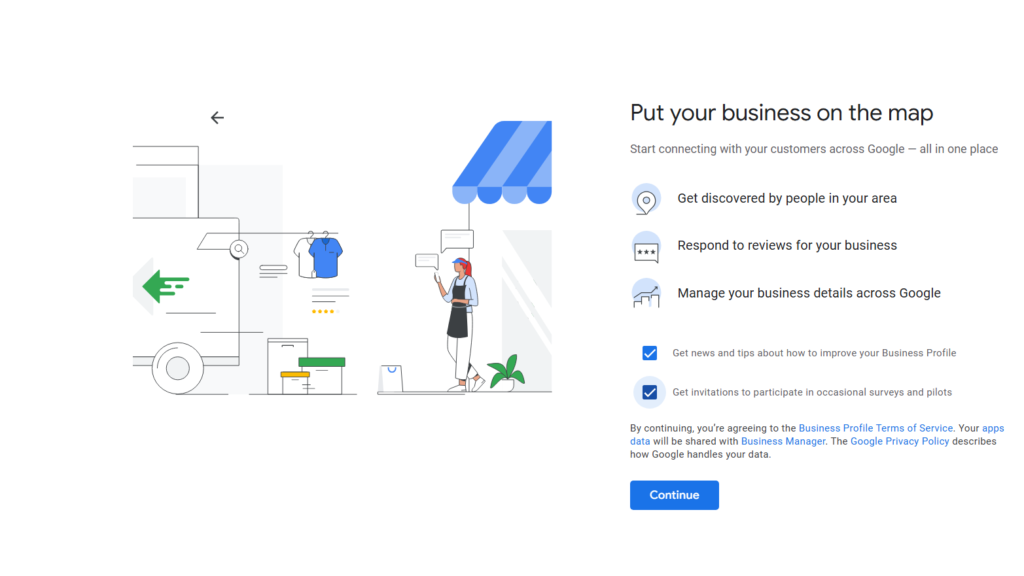
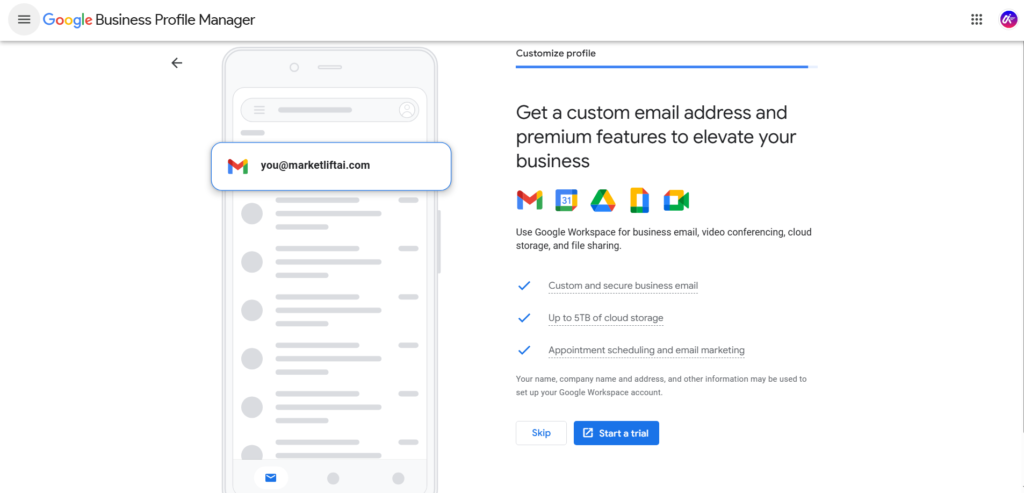
Step 1: Visit Google Business Profile
Go to the official Google Business Profile website and click “Manage Now.”
You will need a Google account to continue.
Step 2: Sign in With a Google Account
Use your business Gmail account to sign in.
It is recommended to use a professional business email for better management and credibility.
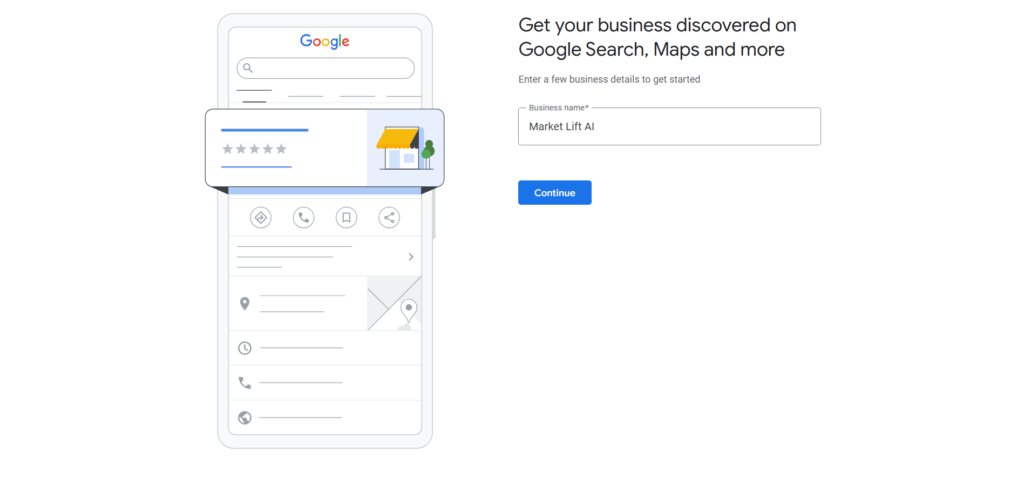
Step 3: Enter Your Business Name
Type your business name exactly as customers know it.
Avoid adding unnecessary keywords to your business name because this violates Google’s guidelines.
For Google My Business SEO, consistent business naming is crucial.
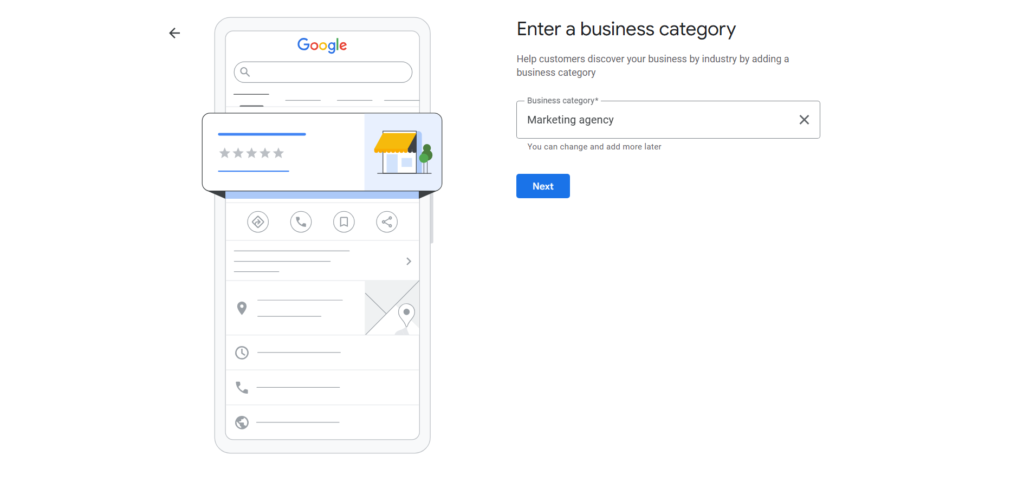
Step 4: Choose Your Business Category
Google can better understand your company if you choose the appropriate category.
For example:
- Restaurant
- Digital marketing agency
- Law firm
- Hair salon
- Real estate agency
Choosing accurate categories improves your Google Business Profile ranking.
Step 5: Add Your Location
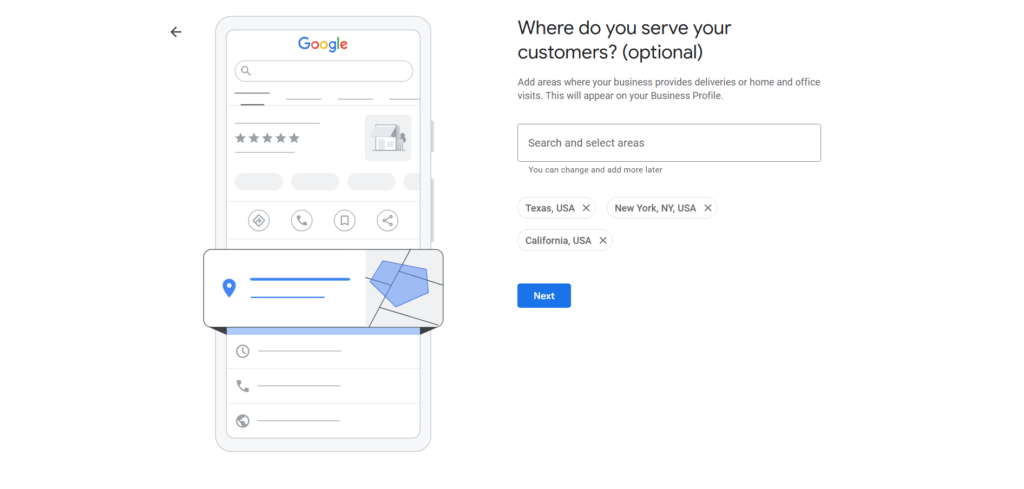
Enter your business address accurately.
For both local SEO and Google Maps SEO, this step is essential.
If you operate a service-area business, you can also define your service locations.
Step 6: Add Contact Information
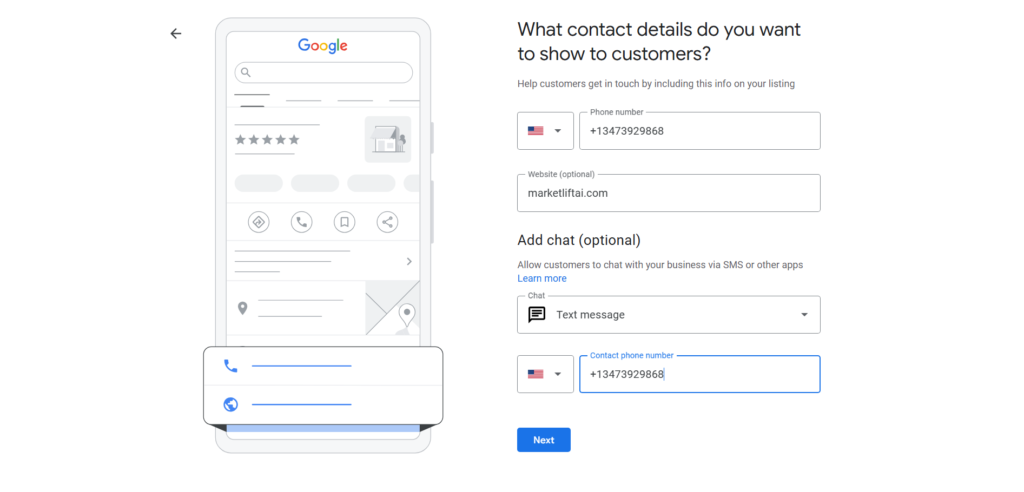
Include:
- Phone number
- Website URL
- Email address
Accurate contact details improve Google Business Profile SEO and client confidence.
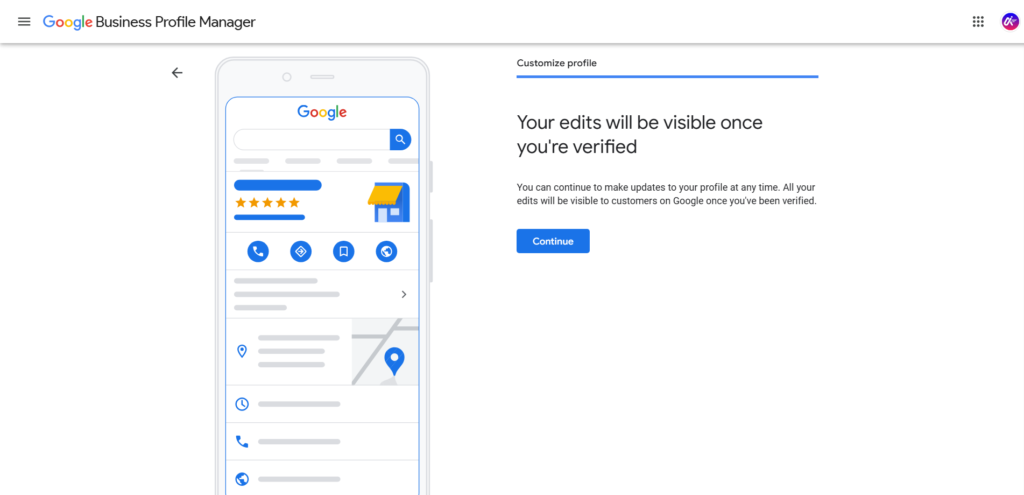
Step 7: Verify Your Business
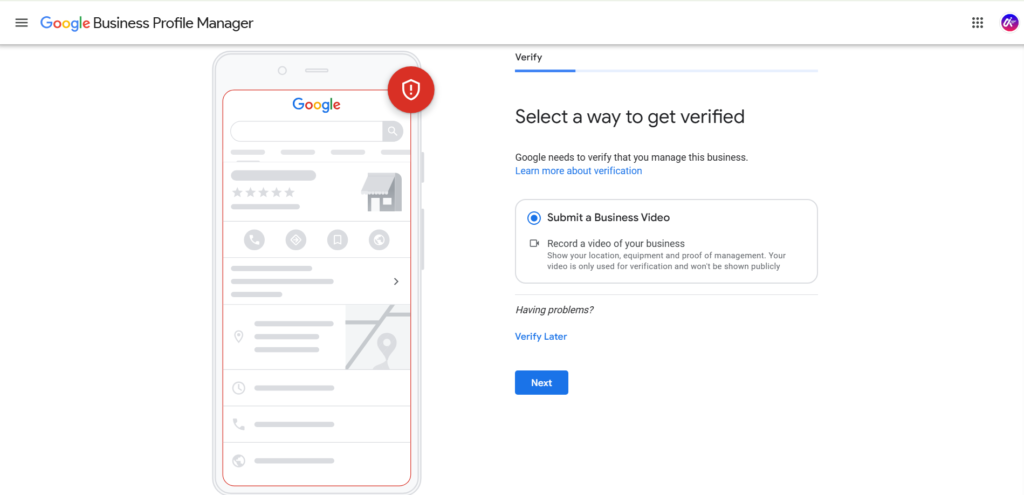
Google requires businesses to verify ownership.
Verification methods may include:
- Postcard verification
- Phone verification
- Email verification
- Video verification
After verification, your Google Business Profile account becomes active.
Once your profile is verified, you can begin optimizing it for better visibility and performance.
How to Optimize Google Business Profile
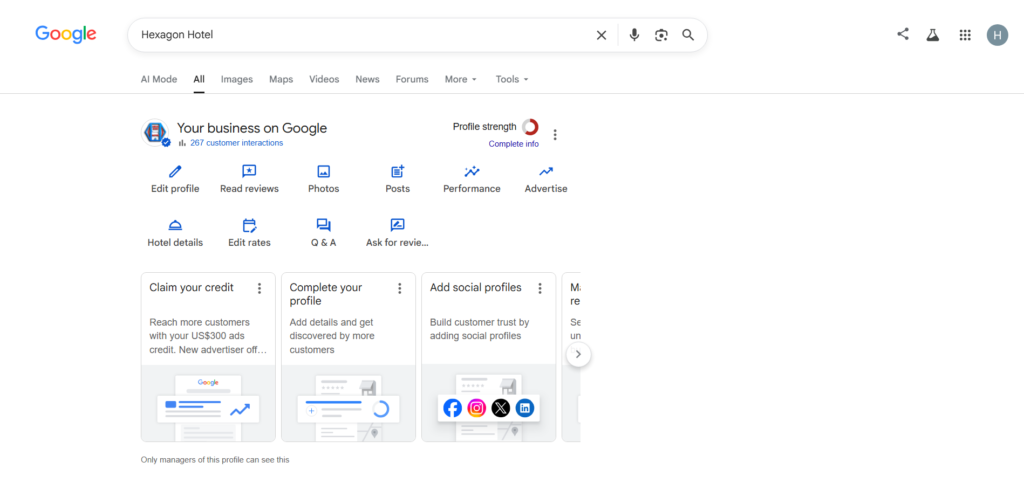
It’ss an ongoing process. Businesses that consistently improve their profiles usually achieve stronger local rankings and better customer engagement.
Complete Every Section of Your Profile
Completing every part of your profile is one of the most crucial Google Business Profile strategies. Companies with comprehensive profiles frequently rank higher in local search results.
Include:
- Business description
- Address
- Contact details
- Opening hours
- Website
- Products and services
- Attributes
- Photos
- FAQs
A complete profile improves customer trust and Google Business Profile optimization.
Use Keywords Naturally in Your Description
Your business description should naturally contain relevant keywords.
Include phrases such as:
- Google My Business optimization
- local SEO
- Google Maps SEO
- local business marketing
Avoid keyword stuffing because Google may penalize unnatural optimization practices.
Instead, write informative and customer-focused descriptions.
Upload High-Quality Photos Regularly
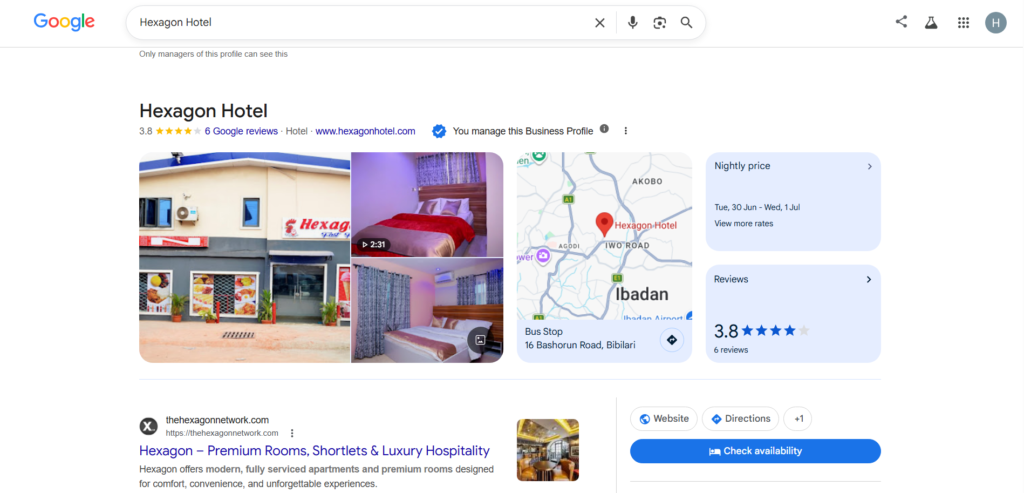
Visual content plays a major role in Google Business Profile optimization in 2026. Customers want to see what your business looks like before visiting your location or contacting your company. Businesses with attractive, professional images usually receive more engagement, more clicks, and greater customer trust.
It’s more effective when businesses upload fresh, high-quality photos regularly. Google also rewards active profiles with stronger visibility in local SEO results.
You should upload different types of images, including:
- Exterior photos
- Interior photos
- Team photos
- Product photos
- Customer experience photos
- Office images
- Event photos
For example, restaurants can upload pictures of meals, seating areas, and customer experiences. Real estate companies can showcase properties. Salons can display hairstyles and beauty transformations.
Companies that consistently upload images improve their Google Maps SEO performance because visual engagement signals activity and professionalism.
Photo optimization tips include:
- Use clear lighting
- Avoid blurry images
- Use original photos
- Upload modern images
- Add images weekly
- Use high resolution
When companies construct visually appealing profiles that grab attention right away, Google Business Profile SEO works best.
Collect More Positive Reviews
Customer reviews are one of the strongest Google Maps ranking factors in 2026. Businesses with more authentic positive reviews usually rank higher in local search results.
Reviews influence:
- Customer trust
- Conversion rates
- Click-through rates
- Brand reputation
- Google Business Profile ranking
One of the best Google Business Profile tips is to actively encourage happy customers to leave reviews after purchases or completed services.
You can request reviews through:
- Email follow-ups
- SMS reminders
- Social media messages
- Website popups
- QR codes in-store
Buying fake reviews violates Google’s policies and can damage long-term Google Business Profile optimization efforts. Businesses should not engage in it.
Instead, focus on creating excellent customer experiences that naturally encourage feedback.
Positive reviews strengthen local business marketing and help businesses compete effectively in local SEO.
Respond to Every Review
Review responses are essential for Google Business Profile. Businesses that actively engage with customer feedback appear more trustworthy and professional.
When customers leave positive reviews, thank them politely. This encourages loyalty and repeat business.
For negative reviews:
- Respond calmly
- Apologize if necessary
- Offer solutions
- Avoid arguments
- Stay professional
Google values profile activity and customer engagement. Responding to reviews signals that your business is active and customer-focused.
Clients also valued businesses that listen and communicate professionally.
Building solid client relationships is just as important to Google Business Profile SEO as rankings.
Keep Business Information Updated
One of the biggest mistakes businesses make is failing to update their information regularly.
Outdated details can frustrate customers and damage your local SEO strategy.
Always ensure the following information is accurate:
- Business name
- Address
- Phone number
- Website
- Opening hours
- Holiday schedules
- Products and services
Consistent information across all platforms improves Google Maps ranking factors and strengthens credibility.
For example, if your business changes its phone number or office location, update your Google Business Profile immediately.
Companies with updated profiles perform better in Google Business Profile optimization because Google prioritizes reliable information.
Add Products and Services
Adding products and services improves customer understanding and strengthens Google Business Profile optimization.
This section allows businesses to showcase:
- Product names
- Service descriptions
- Pricing
- Features
- Photos
Detailed service listings improve visibility in relevant search queries.
For example:
A digital marketing agency can add:
- SEO services
- Content marketing
- Website design
- PPC advertising
A restaurant can add:
- Menu items
- Drinks
- Desserts
- Delivery services
Adding products and services helps businesses optimize Google Business Profile more effectively and improve conversion opportunities.
Post Weekly Updates
Google Posts are an important part of Google Business Profile optimization in 2026.
Businesses can publish updates directly on their profiles to engage customers and increase visibility.
You can post:
- Promotions
- Discounts
- Events
- News updates
- Product launches
- Blog content
- Announcements
Weekly posting signals business activity to Google and improves local SEO performance.
Businesses that post consistently often receive:
- More profile visits
- More engagement
- Better customer interaction
- Increased conversions
Regular updates also help businesses remain competitive in Google Business Profile ranking.
Enable Messaging
Messaging allows customers to communicate directly with businesses through Google Search and Google Maps.
This feature improves customer convenience and enhances local business marketing efforts.
Benefits of messaging include:
- Faster communication
- Better customer support
- More leads
- Improved customer satisfaction
- Increased engagement
Businesses should respond quickly to maintain professionalism and customer trust.
Google Business Profile optimization works best when businesses create smooth communication channels for potential customers.
Use Accurate Business Categories
Business categories help Google understand what your company offers.
Selecting the wrong category can reduce visibility and hurt Google Maps SEO performance.
Choose categories that accurately represent your business.
Examples include:
- Restaurant
- Hotel
- Real estate agency
- Marketing agency
- Medical clinic
- Hair salon
Businesses can also add secondary categories for additional services.
Correct categories improve relevance and strengthen Google Business Profile optimization.
Optimize for Mobile Users
Most local SEO searches now happen on mobile devices. This means businesses must optimize their profiles and websites for mobile users.
Mobile optimization improves:
- User experience
- Website engagement
- Conversion rates
- Search rankings
Businesses should ensure:
- Fast-loading pages
- Mobile-friendly design
- Easy navigation
- Click-to-call buttons
- Responsive layouts
Google prioritizes mobile experiences in local SEO rankings.
Companies that optimize Google Business Profile alongside mobile usability usually perform better in Google Maps ranking.
Add Questions and Answers
The Questions and Answers feature helps businesses provide helpful information directly on their profiles.
Businesses should proactively answer common customer questions, such as:
- Do you offer delivery?
- What are your opening hours?
- Do you accept online payments?
- Is parking available?
- Do you provide appointments?
This section improves customer trust and reduces confusion.
Adding helpful answers strengthens Google Business Profile optimization and improves customer engagement.
Track Insights and Analytics
Google Business Profile includes analytics tools that help businesses measure performance.
Businesses can track:
- Search visibility
- Calls
- Website clicks
- Direction requests
- Customer actions
- Photo views
- Search queries
Analytics help businesses improve their local SEO strategy and make better marketing decisions.
For example, businesses can identify:
- Which keywords drive traffic
- Which posts perform best
- Which locations generate more engagement
Tracking insights helps businesses continuously improve Google Business Profile optimization.
What to Avoid in Your Google Business Profile
Successful Google Business Profile optimization requires avoiding common mistakes that hurt rankings and customer trust.
Keyword Stuffing Your Business Name
Keyword stuffing occurs when businesses add unnecessary keywords to their business names.
Example:
“Texas’s Best Low-Cost SEO Company: Google Business Profile Optimization Services”
This violates Google’s policies and can result in penalties or profile suspension.
Always use your real business name.
Natural optimization is far more effective for long-term local SEO success.
Using Fake Reviews
Fake reviews may temporarily increase ratings, but they damage credibility and violate Google guidelines.
Google actively removes suspicious reviews and may penalize businesses engaging in manipulation.
For Google Business Profile optimization to be sustainable, genuine reviews are essential.
Focus on delivering excellent customer experiences instead.
Adding Incorrect Contact Information
Incorrect information creates confusion and damages customer trust.
Businesses should maintain consistent:
- Addresses
- Phone numbers
- Websites
- Emails
- Opening hours
Accurate information supports local SEO and improves Google Maps ranking factors.
Ignoring Negative Reviews
Negative reviews should never be ignored.
Businesses should respond professionally and attempt to resolve issues respectfully.
Ignoring complaints may discourage future customers and weaken your reputation.
Professional responses demonstrate accountability and customer care.
Uploading Low-Quality Images
Low-quality photos create poor impressions and reduce engagement.
Businesses should invest in professional images whenever possible.
Strong visual branding supports local business marketing and improves customer trust.
Creating Duplicate Listings
Duplicate profiles confuse Google and customers.
Businesses should maintain one verified Google Business Profile account per location.
Duplicate listings can weaken Google Maps SEO performance and reduce ranking consistency.
Leaving Your Profile Inactive
Inactive profiles often lose visibility in search results.
Businesses should regularly:
- Update information
- Publish posts
- Upload photos
- Respond to reviews
- Monitor analytics
Consistency is essential for effective Google My Business optimization.
Choosing the Wrong Business Category
Incorrect categories reduce relevance and visibility.
Always select categories that accurately describe your business services.
Proper categorization improves local SEO strategy and Google Business Profile ranking.
Local Marketing Strategies for Google Business Profile
An effective local business marketing strategy can dramatically improve visibility and customer acquisition.
Optimize for “Near Me” Searches
“Near me” searches continue to grow rapidly in 2026.
Examples include:
- Restaurants near me
- Hotels near me
- Dentists near me
- Hair salons nearby
Optimize your Google Business Profile for local intent to perform better in the above searches.
Include local keywords naturally in your profile and website content.
Use Local Keywords
Local keywords improve relevance in local SEO results.
Examples include:
- Best restaurant in Lagos
- Top lawyer in Abuja
- Digital marketing agency in Nigeria
Local keywords strengthen Google Business Profile optimization and improve search visibility.
Build Local Citations
Local citations are mentions of your business across external websites.
Examples include:
- Online directories
- Business listings
- Industry websites
- Local blogs
Consistent citations improve credibility and support Google Maps ranking factors.
Encourage Customer Check-Ins
Encourage customers to tag your business location on social media platforms.
This increases brand visibility and local engagement.
Platforms include:
- Facebook Business
- Instagram for Business
Customer-generated content supports local business marketing and strengthens social proof.
Get Reviews From Local Customers
Local reviews help businesses establish community relevance.
Encourage customers from your city or region to leave detailed feedback.
This improves trust and strengthens local SEO.
Embed Google Maps on Your Website
Embedding maps improves customer convenience and geographic relevance.
Businesses should place maps on:
- Contact pages
- Service pages
- Footer sections
- Location pages
Embedding maps supports Google Maps SEO and improves user experience.
Use Social Media to Support Local SEO
Social media strengthens online visibility and customer engagement.
Businesses should maintain active profiles on:
- TikTok
- X
Social activity complements Google Business Profile optimization and expands brand reach.
Create Location-Specific Landing Pages
Businesses serving multiple locations should create dedicated pages for each area.
Each location page should include:
- Local keywords
- Service details
- Contact information
- Customer reviews
- Google Maps embeds
Location pages strengthen local SEO strategy and improve Google Business Profile ranking.
Google Business Profile Ranking Factors
Understanding Google Maps ranking factors helps businesses improve local search visibility.
Relevance
Relevance measures how closely your business matches customer searches.
Businesses should optimize:
- Categories
- Descriptions
- Keywords
- Services
Strong relevance improves Google Business Profile optimization.
Distance
The term “distance” refers to how close your company is to the searcher.
Businesses targeting local customers should strengthen geographic relevance through local SEO.
Prominence
Prominence reflects your business reputation online.
Factors include:
- Reviews
- Backlinks
- Media mentions
- Website authority
- Brand recognition
Prominent businesses usually rank higher in Google Maps SEO.
Reviews
One of the most powerful ranking elements on Google Maps is still customer ratings.
Businesses should consistently collect authentic positive reviews.
Activity
Active profiles perform better than inactive ones.
Businesses should regularly:
- Publish posts
- Upload photos
- Respond to reviews
- Update information
Activity signals relevance and engagement.
Citations
Consistent citations strengthen credibility and local SEO.
Companies should maintain accurate business information across all platforms.
Backlinks
Backlinks from reputable websites improve authority and search visibility.
Businesses can earn backlinks through:
- Guest blogging
- PR campaigns
- Local partnerships
- Industry directories
Strong backlinks improve Google Business Profile optimization.
Frequently Asked Questions (FAQ)
Is Google Business Profile free?
Yes. Google Business Profile is completely free to use.
Businesses can create profiles, upload photos, collect reviews, and manage listings without paying Google.
How long does verification take?
Verification timelines depend on the method used.
- Postcard verification may take several days
- Phone verification is faster
- Email verification may be instant
- Video verification can be completed quickly
Can I use Google Business Profile without a website?
Yes.
Businesses can create a profile even without a website.
However, having a website improves local SEO, customer trust, and conversion opportunities.
How often should I post?
Businesses should ideally post weekly.
Regular posting improves engagement, profile activity, and Google Business Profile optimization.
Why is my profile not ranking?
Several issues may affect rankings, including:
- Weak reviews
- Incomplete profiles
- Poor local SEO strategy
- Incorrect categories
- Low activity
- Weak backlinks
- Inconsistent citations
Optimizing a Local Restaurant’s Google Business Profile
To understand how Google Business Profile optimization works in practice, consider a local restaurant that wants to improve its visibility in Google Search and Google Maps.
Before Optimization
When the restaurant first created its profile, several important areas were incomplete:
- Only 5 customer reviews
- Just 3 uploaded photos
- Incomplete business hours
- No menu information
- No Google Posts
- Missing service descriptions
- Limited customer engagement
As a result, the business struggled to appear prominently in local search results when potential customers searched for restaurants in the area.
Optimization Actions Taken
The restaurant implemented several Google Business Profile optimization strategies:
1. Increased Customer Reviews
The business encouraged satisfied customers to leave reviews after dining. Staff members politely requested feedback, and review links were shared through email and social media.
Result: Reviews increased from 5 to 35 within a few months.
2. Uploaded High-Quality Photos
The restaurant added professional images of:
- Signature dishes
- Interior seating areas
- Outdoor dining space
- Staff members
- Special events
Fresh photos were uploaded regularly to keep the profile active.
3. Updated Business Information
The owner completed all profile details, including:
- Accurate business hours
- Phone number
- Website link
- Location information
- Service options
- Restaurant category selection
This helped improve profile completeness and user experience.
4. Added Menu and Services
A complete digital menu was uploaded, making it easier for potential customers to browse offerings before visiting.
5. Published Weekly Google Posts
The restaurant began sharing:
- Special promotions
- New menu items
- Holiday offers
- Community events
These posts helped keep the profile active and engaging.
6. Responded to Customer Reviews
Both positive and negative reviews received professional responses, demonstrating strong customer service and increasing trust among potential visitors.
After Optimization
After consistently applying these optimization strategies, the profile showed significant improvements:
| Before Optimization | After Optimization |
| 5 Reviews | 35 Reviews |
| 3 Photos | 50+ Photos |
| Incomplete Hours | Fully Updated Hours |
| No Menu | Complete Digital Menu |
| No Google Posts | Weekly Posts |
| Limited Engagement | Active Customer Interaction |
Key Benefits Observed
The optimized profile delivered several advantages:
- Increased visibility in local search results
- More profile views from potential customers
- Greater customer trust through positive reviews
- Higher engagement with photos and posts
- Improved chances of appearing in Google Maps searches
- Better user experience for potential diners
Key Takeaway
This example demonstrates that Google Business Profile optimization is not about a single change. It involves consistently improving profile completeness, customer engagement, and content freshness for business information accuracy. Small improvements made over time can significantly strengthen a business’s local online presence and help attract more potential customers.
Google Business Profile Optimization Checklist
✓ Verify profile
✓ Choose primary category
✓ Add services
✓ Upload photos
✓ Collect reviews
✓ Respond to reviews
✓ Post weekly
✓ Track insights
Conclusion
Google Business Profile optimization is one of the most powerful local SEO strategies for businesses in 2026. Businesses that optimize their Google Business Profile can increase visibility, create customer trust, generate more leads, and strengthen their online presence.
As competition continues to grow, businesses must focus on maintaining accurate information, collecting authentic reviews, publishing regular updates, and engaging with customers consistently.
An optimized Google Business Profile helps businesses appear in Google Search, Google Maps, and local search results where customers are actively looking for products and services.
To succeed with Google Business Profile optimization in 2026, businesses should focus on:
- Accurate profile information
- High-quality photos
- Positive customer reviews
- Local SEO strategy
- Mobile optimization
- Consistent updates
- Strong backlinks
- Customer engagement
- Local citations
Businesses that apply these Google My Business tips consistently will improve their Google Maps ranking, increase conversions, and attract more local customers.
If you want your business to be found on Google, now is the perfect time to invest in Google Business Profile and build a stronger digital presence.

Pingback: latest Social Media Management Platforms for Agencies and Creators - MarketLiftAI