
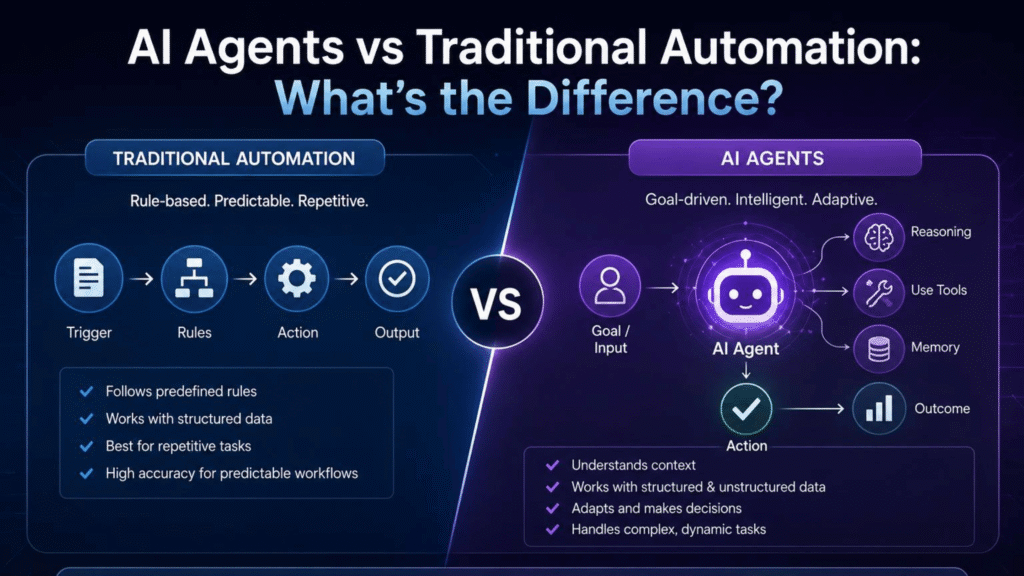
Artificial intelligence is moving beyond answering questions and generating content. Today, some AI systems can also use tools, retrieve information, follow workflows, and take actions to accomplish specific objectives. These systems are commonly known as AI agents. But what is an AI agent, how does it work, and how is it different from a chatbot or an AI assistant?
An AI agent is a software system designed to pursue a defined goal by interpreting information, selecting actions, using available tools, and evaluating the results. Depending on its design, it may complete several steps independently or ask a human to approve important decisions.
For businesses, AI agents can support customer service, sales research, marketing operations, document processing, data analysis, and administrative work. However, their usefulness depends on the task, the system’s quality, its integrations, and the safeguards around its actions.
This guide explains how AI agents work, explores practical examples, compares agents with chatbots, and provides a framework for choosing and implementing one.
Written by Mukthar Salam
Last reviewed: September 2026
Important Note: These statistics show a market moving from experimentation toward broader implementation, while outcomes and deployment scale remain uneven. Businesses should use the figures as context—not as a guarantee of results—and evaluate AI agents against their own workflows, budgets, security requirements, and measurable objectives.
AI Agent Adoption Statistics: What the Latest Research Shows
AI agents are attracting growing interest from businesses, but adoption levels vary by company size, industry, and how researchers define implementation. Surveys published in 2025 show that many organizations are experimenting with AI agents, investing in them, or expanding their use. However, reported adoption does not necessarily mean that an organization has fully integrated agents into its operations or achieved substantial financial returns.
1. AI Agent Adoption and Business Investment
PwC’s May 2025 AI Agent Survey found that 79% of surveyed business executives said their companies were already adopting AI agents. The survey also indicated that investment plans were growing: 88% said their teams or business functions planned to increase AI-related budgets over the following 12 months because of agentic AI. These findings suggest that many businesses viewed AI agents as a developing business priority rather than simply a technology experiment.
Enterprise technology leaders reported similar momentum in Cloudera’s 2025 research. 57% said their organizations had implemented AI agents within the previous two years, including 21% that had implemented them within the previous year. Looking ahead, 96% of surveyed enterprises planned to expand their use of AI agents over the next 12 months, while 50% planned significant, organization-wide expansion. These figures describe reported implementation and future intentions, not proof that every planned deployment was completed.
2. Experimentation, Scaling, and Measurable Business Impact
Adoption figures need to be interpreted carefully because experimenting with an AI agent is different from using one in a live business process or scaling it across departments.
McKinsey’s State of AI 2025 survey found that 23% of respondents said their organizations were scaling an agentic AI system in at least one business function, while another 39% said their organizations had begun experimenting with AI agents. This indicates that organizations were progressing at different speeds, with experimentation more widespread than scaling.
The same McKinsey research reported that 39% of respondents said AI had produced some level of impact on their organization’s earnings before interest and taxes (EBIT). However, most respondents reporting an AI-related EBIT impact attributed less than 5% of EBIT to AI. This is an important distinction: organizations may experience benefits from individual AI applications without yet seeing a large effect on overall company earnings. The figures concern AI broadly and should not be interpreted as results attributable to AI agents alone.
3. How Many AI Agents Are Businesses Using?
The number of AI agents deployed can vary significantly between small businesses and large enterprises. Glide’s State of AI in Operations 2025 report found that 47% of businesses already using AI said they were using AI agents, while another 47% said they planned to adopt them. These figures apply to businesses using AI, not to all businesses in the economy.
Among organizations already using AI agents, 78% reported deploying between two and ten agents. Glide’s State of AI in Operations 2025 also found that more than half of enterprise organizations were actively using AI agents, compared with approximately one-third of small businesses. The report showed a difference in deployment scale: 26% of enterprise organizations reported deploying 11 or more AI agents, compared with only 3% of small businesses.
These findings suggest that larger organizations may have more resources to deploy agents across multiple teams and workflows. However, small businesses do not necessarily need dozens of agents to benefit. A single well-designed agent that solves a specific, recurring problem may be more useful than a large deployment that is difficult to manage.
4. Customer Service and AI-Agent Budgets
Investment levels also show that some organizations are preparing substantial budgets. This is a finding about the surveyed companies, not a typical cost that every business should expect to pay.
What Is an AI Agent?
An AI agent is a software system that uses artificial intelligence and other technical components to work toward a defined objective. It may interpret a request, plan a sequence of steps, access approved information, use external tools, perform actions, and check whether the task has been completed.
In simple terms, a conventional AI application might explain how to complete a task. An AI agent may be able to carry out some of the steps needed to complete it.
For example, a business owner could ask an AI agent to research potential customers. Depending on its capabilities and permissions, the agent might identify relevant companies, gather information from approved sources, organize prospects according to specified criteria, and prepare a report for review.
The agent does not automatically have access to every website, account, or business application. Its actual capabilities depend on its tools, integrations, instructions, permissions, and system design.
The most important question is not whether a product is marketed as an AI agent. It is whether the system can reliably perform the actions your task requires.
How Do AI Agents Work?
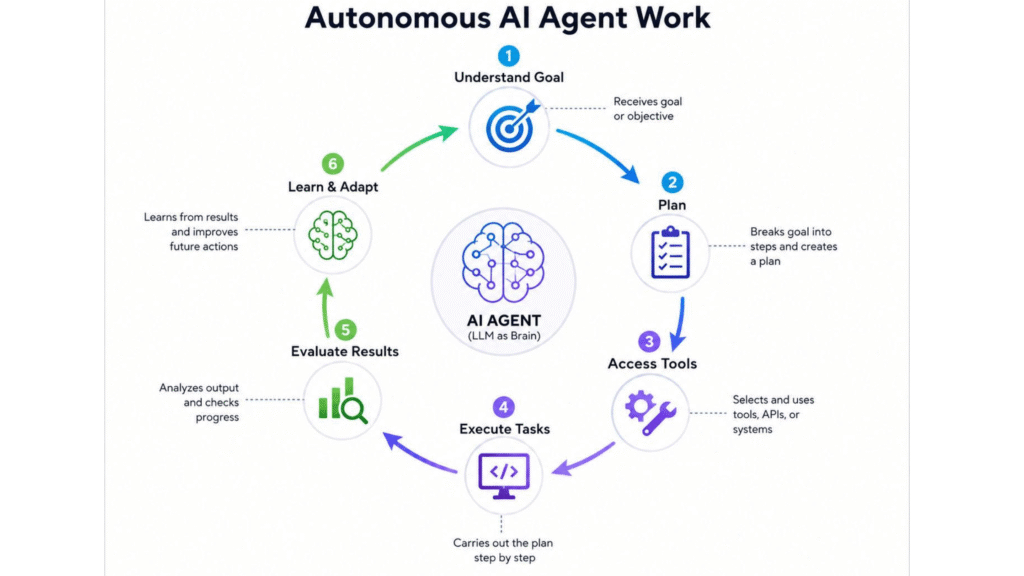
AI agents typically operate through a cycle of interpreting a goal, planning, using tools, taking action, checking results, and deciding what to do next.
1. Receive and interpret a goal
The agent receives an objective, such as preparing a competitor analysis or organizing customer-support requests. It must determine what information is needed, what constraints apply, and what the expected result should look like.
If a request is unclear, a well-designed agent should ask for clarification rather than make an important assumption.
2. Create a plan
The agent may divide the objective into smaller steps. For a competitor analysis, those steps might include identifying competitors, gathering information, comparing products, checking available pricing information, and preparing a summary.
Some agents follow predefined workflows, while others can select their next steps dynamically. Many business systems combine both methods.
3. Select and use tools
Tools allow an AI agent to interact with other systems. Depending on the task, these tools might include web search, databases, spreadsheets, calendars, email, customer relationship management software, or business APIs.
Access should be limited to what the agent actually needs. Reading a customer record is different from modifying that record or issuing a refund.
4. Perform actions
The agent uses its available tools to perform the permitted steps. It might retrieve a document, prepare a report, organize data, create a task, or draft a customer response.
Actions that have financial, legal, security, or reputational consequences may require human approval.
5. Check the result and adjust
A reliable AI agent should not simply assume that every action succeeded. It may check whether the correct information was retrieved, whether a tool returned an error, or whether additional steps are necessary.
If the task cannot be completed safely or accurately, the agent should be able to stop, request clarification, or escalate the issue.
AI Agent Examples: How Businesses Can Use Them
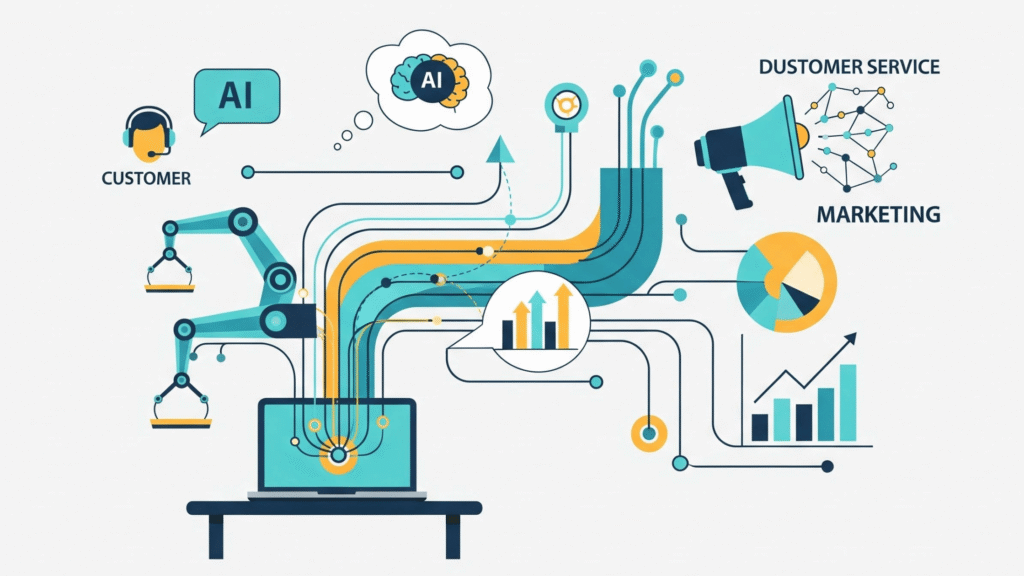
AI agent examples are easier to understand when they are connected to everyday business workflows.
Customer service AI agents
A customer-service agent can retrieve approved help articles, look up permitted order information, draft responses, and update support tickets. It may also identify unusual cases and direct them to a human employee.
For example, an online store might use an agent to answer routine questions about delivery status while requiring employee approval for disputed refunds.
Customer service is also a prominent area of interest for agent deployment. PwC found that 57% of companies already using AI agents were either actively using them or planning to use them in customer service over the following six months. Possible applications include answering routine questions, retrieving order information, updating support tickets, and escalating complex cases to employees.
Sales AI agents
A sales agent can help research prospective customers, organize company information, qualify leads against defined criteria, and prepare personalized outreach drafts.
A practical workflow could begin with a list of potential customers and end with a reviewed prospect report in the company’s CRM. Human approval can remain in place before messages are sent.
Marketing AI agents
Marketing agents can support audience research, campaign reporting, content planning, customer-feedback analysis, and performance summaries.
They may reduce repetitive research and reporting work, but marketers should still verify claims, review public-facing content, and make strategic decisions.
Research AI agents
A research agent can search approved sources, collect information, compare evidence, and prepare a structured report.
Its findings should be checked against the sources. An agent can misinterpret a document or produce an unsupported conclusion, so source verification remains important.
Administrative AI agents
Administrative agents can help schedule meetings, prepare agendas, summarize discussions, organize documents, and create follow-up tasks.
These applications can be useful when employees repeatedly transfer information between different business tools.
Coding AI agents
Coding agents can support software development through code generation, debugging, testing, documentation, and repository analysis. Because these systems may interact with source code, they should operate with suitable permissions, testing procedures, and review before important changes reach production.
Where AI Agents Can Provide the Most Value
Not every task needs an agent. A useful candidate workflow often contains several of these characteristics:
- multiple steps;
- repetitive work;
- information retrieval;
- predictable tools;
- measurable outcomes;
- defined rules;
- manageable risk;
- clear escalation conditions.
This leads to an important principle: Use agents where they solve a genuine workflow problem, not simply where AI is available.
When You Should Not Use an AI Agent
An authoritative guide should also explain when not to use the technology. A conventional solution may be preferable when:
- the process is completely deterministic;
- the workflow has very low complexity;
- a simple automation can solve the problem;
- the task does not require external tool interaction;
- there is no need for reasoning;
- the cost of an agent exceeds its expected value;
- the consequences of autonomous errors are unacceptable.
For example, if a process is simply: “When a customer submits Form A, send Email B,” you may not need an AI agent.
A conventional workflow automation tool can probably handle it more predictably. The more useful question is not: “Can AI do this?” It is: “Does AI add enough value to justify its complexity and risk?”
AI Agent vs. Chatbot vs. AI Assistant
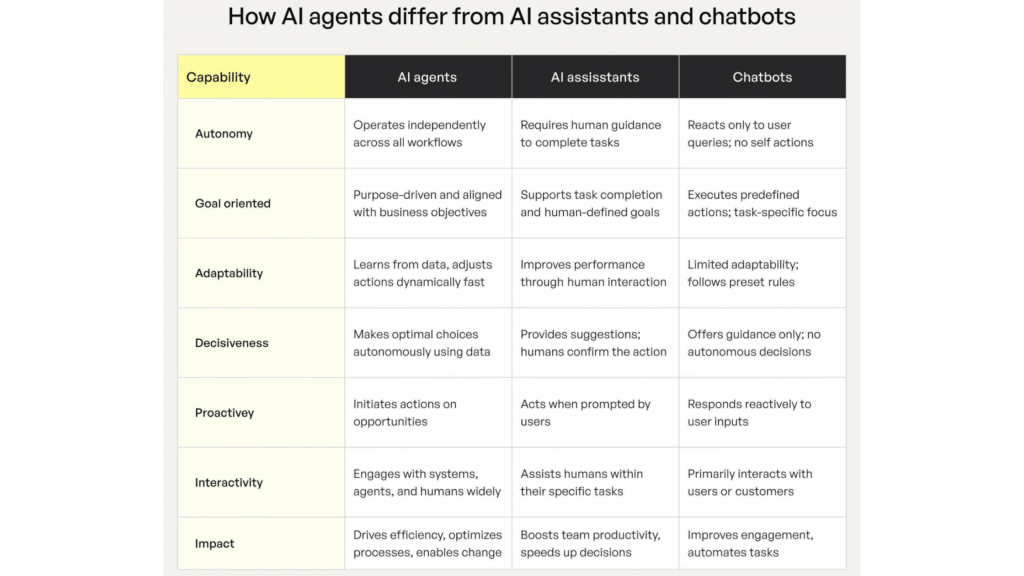
AI agents, chatbots, and AI assistants overlap, but their typical roles differ.
| Technology | Main purpose | Example |
| AI model | Generates or analyzes information | Explains a technical concept |
| Chatbot | Conducts a conversation | Answers common customer questions |
| AI assistant | Helps a person complete tasks | Drafts an email or summarizes a document |
| AI agent | Works toward an objective through multiple steps | Researches prospects, organizes findings, and prepares a CRM update |
| Multi-agent system | Coordinates multiple specialized agents | One agent researches, another analyzes, and another reviews |
These categories are not rigid. A modern AI assistant may include agentic capabilities, and a chatbot may connect to tools that allow it to perform actions.
The key distinction is what the system can actually do. If your business only needs to answer frequently asked questions, a chatbot may be sufficient. If the workflow involves several steps, external tools, and decisions, an AI agent may be worth evaluating.
AI Agents vs Chatbots
A chatbot primarily focuses on conversation. An AI agent can use conversation as an interface while performing actions behind the scenes.
For example, a traditional chatbot might answer: “Our return policy allows customers to return eligible products within 30 days.” An agentic customer-service system might:
- Identify the customer.
- Retrieve the order.
- Check the purchase date.
- Determine whether the product is eligible.
- Explain the applicable policy.
- Initiate the appropriate workflow.
- Escalate unusual circumstances to a human.
The difference is not that chatbots are obsolete. Chatbots remain appropriate for many situations. If a business simply needs to answer frequently asked questions, a conventional chatbot may be sufficient.
An agent becomes more relevant when the workflow involves multiple steps, external information, tools, decisions, and actions.
AI Agents vs AI Assistants
An AI assistant generally helps a user accomplish something. An agent can potentially be assigned an objective and work through the steps required to accomplish it. For example:
AI assistant
You ask: “Help me write a sales email.” The assistant drafts the email.
AI agent
You ask: “Prepare outreach for these qualified prospects.” The agent could potentially:
- research the companies
- retrieve relevant information
- identify personalization opportunities
- draft messages
- add them to the CRM
- prepare follow-up tasks
- request approval
The distinction is not absolute because modern AI assistants increasingly include agentic capabilities. Therefore, evaluate the actual workflow capabilities rather than relying on product labels.
What Are the Main Types of AI Agents?
AI agents can be grouped in different ways, and there is no single classification that describes every modern system. Common categories include the following.
Reflex agents: Respond to current inputs according to defined rules.
Goal-based agents: Select actions intended to achieve a specified outcome.
Utility-based agents: Compare possible outcomes against factors such as cost, speed, quality, or risk.
Learning agents: Adapt their behavior using feedback, evaluation, or updated information. This does not necessarily mean that the underlying AI model is retrained.
Planning agents: Break an objective into a sequence of dependent steps.
Autonomous agents: Perform defined tasks with limited human intervention.
Conversational agents: Focus on natural-language interaction.
Workflow agents: Participate in business processes such as ticket handling or data processing.
Research agents: Gather and organize information from approved sources.
Coding agents: Assist with software development tasks.
Multi-agent systems: Coordinate multiple agents that perform different parts of a larger workflow.
These categories can overlap. A single system might be conversational, goal-oriented, and connected to a business workflow at the same time.
More agents do not automatically produce better results. A multi-agent system adds complexity and should be used only when separate roles genuinely improve the workflow.
The Core Components of an AI Agent
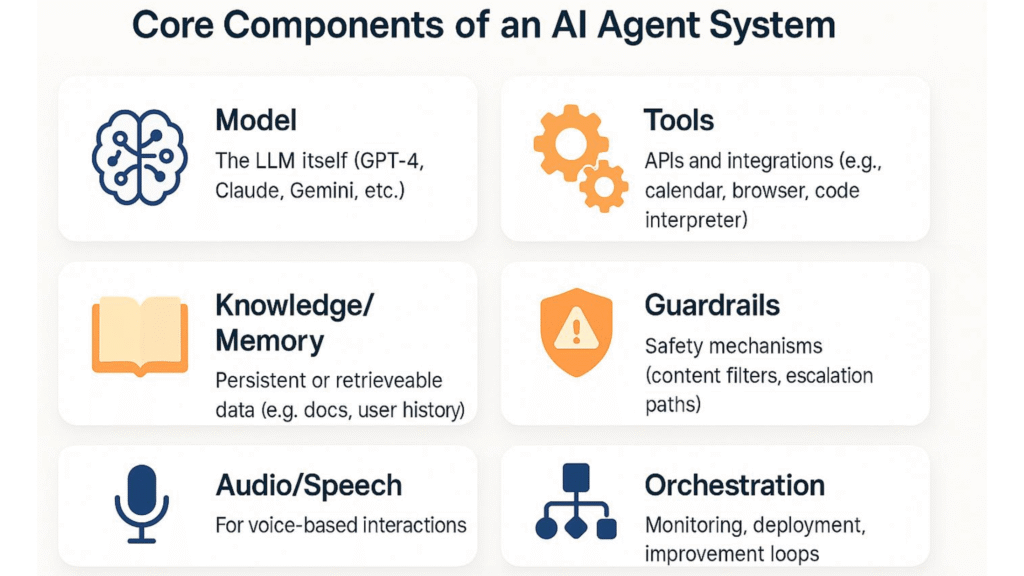
A practical AI agent can be viewed as a collection of interconnected components: Model + Instructions + Tools + Data + Memory + Orchestration + Guardrails + Evaluation + Monitoring. Not every system uses every component in the same way.
1. AI Model
The model provides capabilities such as:
- language understanding
- reasoning
- classification
- summarization
- generation
- planning
- code generation
- information extraction
Different tasks may require different models. A simple classification task may not require the same model as a complex multi-step decision.
2. Instructions
Instructions establish the agent’s role and boundaries.
For example: You are a customer-support agent. Verify the customer’s account before accessing order information. You may explain eligible refunds but must obtain human approval before issuing refunds above the permitted threshold.
Good instructions should define:
- responsibilities
- limitations
- allowed actions
- prohibited actions
- escalation conditions
- output requirements
3. Tools
Tools allow the agent to interact with other systems. Examples include:
- CRM tools
- search tools
- email tools
- calendars
- databases
- accounting platforms
- project management systems
- document systems
- APIs
The tool layer is often what transforms an AI application from a system that generates information into one that can execute parts of a workflow.
4. Memory and Context
Memory allows a system to retain relevant information. This can include:
Short-term context
Information required during the current task.
Persistent information
Approved information retained between sessions.
External knowledge
Information retrieved from:
- documents
- databases
- knowledge bases
- customer records
- internal systems
Memory can make an agent more useful, but it also creates privacy and governance responsibilities. Organizations should know:
- what is stored
- where it is stored
- how long it is retained
- who can access it
- how it can be deleted
- whether information is used for model improvement or training
5. Orchestration
Orchestration determines how the different components interact. It can control:
- which agent runs
- which tool is selected
- what happens next
- when a workflow stops
- how errors are handled
- when humans are involved
- how multiple agents interact
Modern systems may use a single-agent architecture or a multi-agent architecture. OpenAI’s current guidance recommends starting with a focused single-agent design when possible and adding complexity only when the workflow actually requires it.
6. Guardrails
Guardrails are controls that restrict what an agent can do. Examples include:
- permission limits
- authentication
- spending limits
- data-access restrictions
- approval requirements
- rate limits
- input validation
- output validation
- content policies
- tool restrictions
A useful principle is: Give an agent the minimum access necessary to perform its job.
If an agent only needs customer-support records, there is little reason to give it unrestricted access to payroll, banking, or unrelated business systems. This is an application of the principle of least privilege.
7. Evaluation
An agent should be tested before and after deployment. Useful evaluation metrics include:
- task completion rate
- accuracy
- error rate
- tool-use accuracy
- escalation rate
- latency
- cost per task
- reliability
- user satisfaction
- policy violations
A demonstration is not an evaluation. A product can perform impressively in a controlled demonstration and behave differently when exposed to incomplete information, ambiguous requests, and real-world data.
Benefits of AI Agents for Small Businesses
AI agents can provide value when they solve a clear business problem.
Automating repetitive work: Agents may assist with routine research, document handling, data organization, scheduling, and support workflows.
Supporting employee productivity: Employees may spend less time gathering information or transferring data between applications and more time on work requiring judgment, creativity, and customer relationships.
Evidence from PwC’s May 2025 AI Agent Survey supports the potential productivity benefits: 66% of companies already adopting AI agents reported measurable productivity gains. However, businesses should measure their own results, including time saved, task accuracy, employee review time, and the cost of running the system, rather than assuming they will achieve the same outcome.
Improving workflow speed: A well-designed agent may complete several connected steps without requiring a person to initiate every action.
Supporting consistency: Agents operating within a defined process can apply the same rules repeatedly, although their results still need to be tested.
Improving information access: Agents connected to approved company knowledge bases may help employees find relevant information more quickly.
Supporting business growth: Automating suitable tasks can help a small business handle additional work without increasing manual effort at the same rate. The actual benefit depends on accuracy, operating costs, and the amount of human review required.
These are potential benefits, not guaranteed outcomes. Businesses should measure the results of a pilot before expanding an agent’s responsibilities.
Risks and Limitations of AI Agents
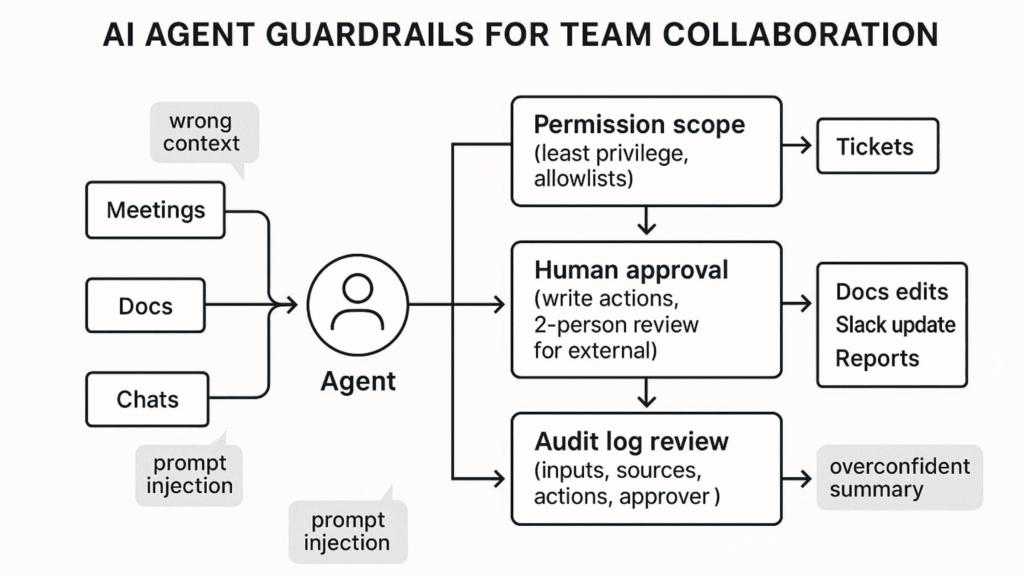
AI agents are not automatically accurate, secure, or cost-effective. Giving an AI system the ability to take action can increase the consequences of mistakes.
Incorrect information
An agent may produce an incorrect answer or misinterpret a source. Where accuracy matters, use approved information sources, validation checks, and human review.
Security and privacy risks
An agent connected to email, customer records, or business systems may access sensitive information. Limit its permissions, protect credentials, monitor activity, and establish rules for handling and retaining data.
Trust remains an important adoption challenge. In PwC’s survey, 28% of executives ranked a lack of trust in AI agents among their top three challenges to realizing value. Businesses can address this concern by limiting permissions, logging actions, testing agents against realistic scenarios, and requiring human approval for sensitive or high-impact decisions.
Prompt injection
External documents, websites, and messages can contain instructions intended to manipulate an AI system. Agents should distinguish trusted instructions from untrusted content, and their available actions should remain restricted even if misleading content is encountered.
Unwanted actions
An agent might misunderstand a request or choose an inappropriate action. Use approval checkpoints for consequential tasks such as financial transactions, important customer communications, or changes to critical records.
Costs and complexity
The cost of an AI agent may include subscriptions, model usage, integrations, development, monitoring, maintenance, training, security, and employee review. A conventional automation workflow may be more predictable and less expensive for a simple task.
Businesses should assess these risks throughout implementation, using established AI risk-management guidance where appropriate.
How to Choose an AI Agent
Choosing an AI agent should start with the business problem rather than a list of popular products.
Step 1: Identify a specific problem
Document the task that consumes too much time, creates bottlenecks, or involves repetitive manual work. Define the expected result and establish a baseline so that you can measure improvement.
Step 2: Map the workflow
List the steps required to complete the task, the systems involved, the people responsible, and the common errors. Decide which steps could be automated and which need human judgment.
Then classify each step.
| Task | Agent role | Human role |
| Retrieve company information | Automate | Review if needed |
| Classify prospect | Assist/automate | Review exceptions |
| Update CRM | Automate | Audit |
| Draft outreach | Automate | Approve |
| Send sensitive outreach | Approval required | Final decision |
This exercise can reveal that you do not actually need a fully autonomous agent. You may only need targeted automation.
Step 3: Check integrations
Confirm that the agent works with the tools your business already uses. Check whether it can retrieve information, create or update records, restrict permissions, and maintain an audit trail.
Step 4: Test accuracy and reliability
Test realistic situations, including incomplete information, ambiguous requests, unavailable tools, and unexpected results. Measure task completion, errors, correction time, escalation rates, and cost per completed task.
Step 5: Review security and oversight
Determine what information the agent can access, which actions it can perform, who can review its activity, and when it must request approval. Apply the principle of least privilege: give the agent only the access it needs.
Step 6: Calculate the total cost
Consider software, usage, integrations, maintenance, security, training, and human review. Compare those costs with measurable benefits such as time saved, fewer errors, or faster service.
Enterprise AI-agent spending can be substantial. G2’s 2025 AI Agent Insight Report found that 40% of surveyed companies had allocated at least $1 million to AI agents, including software, cloud services, and related staffing. This figure reflects the surveyed companies and is not a recommended budget for every organization. Small businesses should estimate costs based on their specific use case, usage volume, integrations, maintenance, and human oversight.
Step 7: Start with a small pilot
Choose one low-risk workflow with a clear success measure. Compare its results against the original process, correct problems, and expand only when the evidence supports doing so.
How to Measure AI Agent ROI
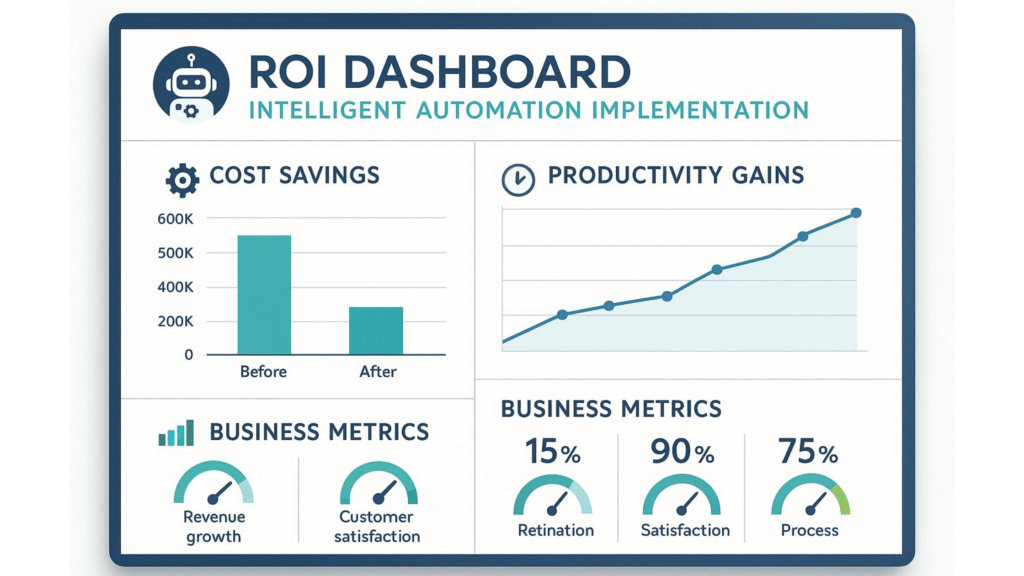
A simple way to evaluate an AI agent is to compare the value it creates with its total cost.
Consider a hypothetical business that spends 20 employee hours each week researching leads. After introducing an agent, employees spend eight hours reviewing and correcting the research.
That is a potential reduction of 12 hours of manual work each week. However, the business should also check whether lead quality changes, errors increase, conversions improve, or employees spend extra time correcting inaccurate results.
A useful framework is: Net business value = Time savings + Additional revenue + Error reduction − Total implementation and operating costs.
Use actual business measurements rather than relying solely on a product demonstration or a vendor’s projected savings.
A Practical AI Agent Evaluation Scorecard
Instead of asking which product is “best,” create your own requirements matrix.
| Criterion | Questions to Ask |
| Use case fit | Does it solve the actual problem? |
| Task capability | Can it complete the required steps? |
| Integrations | Does it connect to existing systems? |
| Tool access | Can it safely use required tools? |
| Accuracy | How often does it complete tasks correctly? |
| Reliability | How does it behave when things go wrong? |
| Security | Can permissions be restricted? |
| Privacy | How is business and customer data handled? |
| Human oversight | Can approval checkpoints be configured? |
| Auditability | Are actions and decisions logged? |
| Cost | What is the total cost of ownership? |
| Scalability | Can it handle increased workload? |
| Maintenance | How much ongoing work is required? |
| Vendor support | What happens when something fails? |
This approach produces a much more useful buying decision than simply choosing the platform with the largest feature list.
A 30-Day AI Agent Implementation Plan
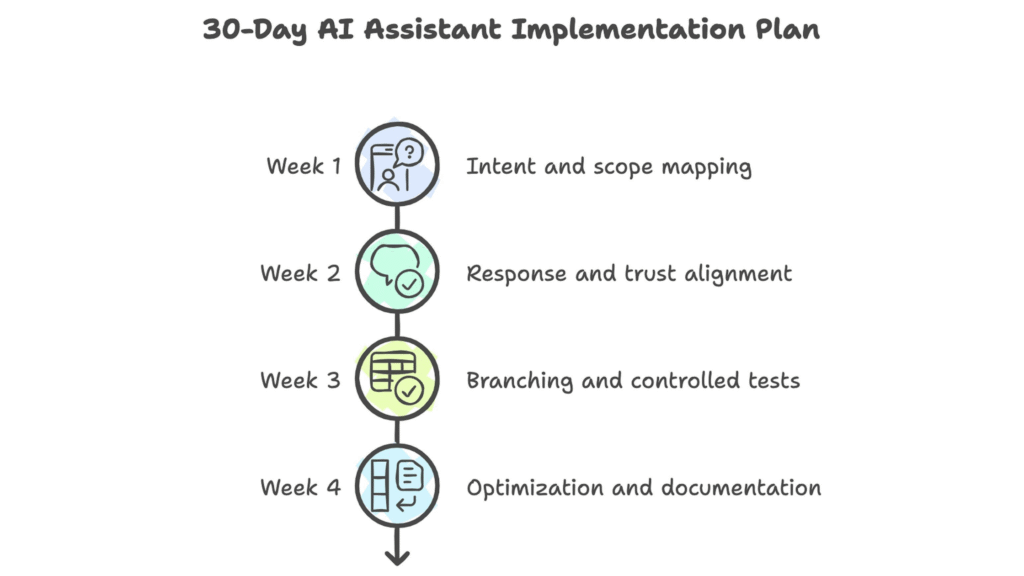
For a small business, a gradual 30-day approach can reduce unnecessary risk.
Week 1: Identify the Workflow
Document:
- current process
- people involved
- systems involved
- time required
- common errors
- desired outcome
Choose one workflow.
Week 2: Design the Agent
Define:
- role
- instructions
- tools
- data
- permissions
- approval points
- escalation rules
- success metrics
Week 3: Pilot
Run the agent on realistic cases.
Track:
- completion rate
- errors
- cost
- speed
- human corrections
- user feedback
Do not immediately give the agent broad permissions.
Week 4: Evaluate and Improve
Compare results with your baseline. Ask:
- Did the workflow improve?
- Did errors increase?
- Was the cost justified?
- Did employees save time?
- Did customers benefit?
- Are security controls sufficient?
- Should the workflow be expanded, redesigned, or abandoned?
This final question matters. Not every AI pilot needs to become a permanent AI system.
The Most Important Principle When Choosing an AI Agent
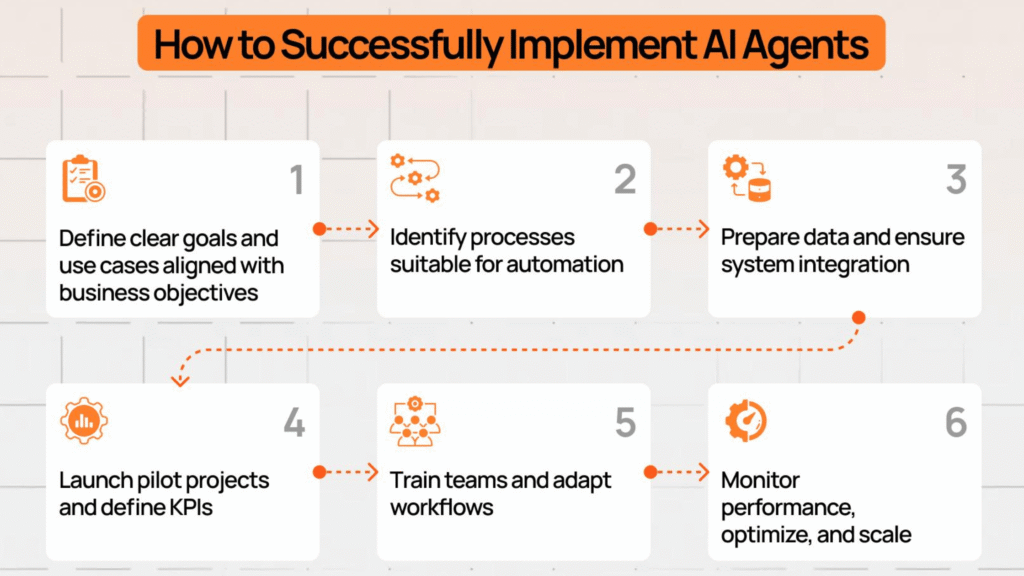
The strongest purchasing decision is rarely: “Which agent has the most features?”
Instead, evaluate: Problem → Workflow → Required capability → Risk → Integration → Cost → Measurement.
When the problem is unclear, the agent will not magically solve it. When the workflow is poorly designed, adding AI may simply automate a bad process. If permissions are excessive, autonomy can increase risk. If performance is not measured, you cannot determine whether the investment worked.
Methodology note:
AI-agent capabilities, terminology, products, and security practices are evolving rapidly. Where this article discusses general concepts, we prioritize established technical principles over vendor-specific claims. Product capabilities should be verified against current official documentation before making purchasing or implementation decisions.
Frequently Asked Questions About AI Agents
What is an AI agent in simple terms?
An AI agent is software that works toward a goal by interpreting information, selecting actions, using available tools, and checking results. Its level of autonomy depends on how it is designed and configured.
How do AI agents work?
AI agents typically interpret a goal, plan or follow a workflow, use tools, take permitted actions, evaluate the results, and either continue, finish, or request help.
What is the difference between an AI agent and a chatbot?
A chatbot primarily focuses on conversation. An AI agent can potentially perform multi-step tasks, use external tools, and work toward a defined objective.
The two categories overlap because modern chatbots can include agentic capabilities.
What is the difference between an AI agent and an AI assistant?
An AI assistant generally helps a user perform tasks, while an AI agent can potentially execute multiple steps toward a defined objective. Modern products can combine both approaches.
What are AI agents used for?
AI agents can support customer service, sales research, marketing, administration, software development, data analysis, document processing, and other multi-step workflows.
Can small businesses use AI agents?
Yes. A small business can start with a narrowly defined workflow, such as organizing support requests or preparing prospect research. The best starting point is a task with measurable value and manageable risk.
Are AI agents fully autonomous?
No. Some require approval for important actions, while others can complete defined workflows with limited intervention. The appropriate level of autonomy depends on the task and the consequences of failure.
What are the main risks of AI agents?
Important risks include:
- incorrect information
- incorrect actions
- excessive permissions
- privacy problems
- prompt injection
- security vulnerabilities
- tool failures
- unexpected costs
- insufficient monitoring
- excessive autonomy
How much do AI agents cost?
There is no single price. Costs may include subscriptions, model usage, API calls, integrations, development, maintenance, monitoring, and human oversight. Evaluate the total cost of ownership rather than the subscription alone.
Are AI agents better than chatbots?
Not necessarily. Chatbots are often suitable for straightforward conversations and frequently asked questions. AI agents may be more useful when a task requires several steps and interaction with external tools.
Are AI agents replacing employees?
That is not a useful assumption to make for every implementation. Agents can automate portions of workflows, while employees continue to provide judgment, oversight, creativity, accountability, and relationship management.
The practical question for a business is which tasks should be automated and which should remain human-controlled.
Can AI agents make decisions?
Yes, depending on how they are designed.
However, the fact that an agent can make a decision does not mean it should make every decision without human review. High-impact decisions generally require stronger controls and appropriate human oversight.
What is an AI agent platform?
An AI agent platform provides infrastructure for creating, deploying, integrating, monitoring, or managing agentic systems.
Depending on the platform, capabilities may include:
- model access
- tool integration
- workflow orchestration
- memory
- authentication
- evaluation
- monitoring
- governance
What are AI agent tools?
AI agent tools are functions or external systems that allow an agent to retrieve information or take actions. Examples include:
- search
- databases
- CRM systems
- calendars
- APIs
- spreadsheets
- code execution
- business applications
What is a multi-agent system?
A multi-agent system uses multiple specialized agents within one broader workflow.
For example: Research Agent → Analysis Agent → Writing Agent → Review Agent. Multi-agent architectures can be useful, but they also introduce additional complexity and should not be used without a clear reason.
What is the difference between AI automation and an AI agent?
Traditional automation often follows predefined rules. An AI agent can use an AI model to interpret objectives, handle ambiguity, select tools, and adapt its workflow.
However, many real-world systems combine deterministic automation with AI rather than choosing one exclusively.
Is ChatGPT an AI agent?
ChatGPT is an AI assistant that can also provide agentic capabilities in certain configurations and workflows. The important distinction is between a system that merely generates a response and a system that can plan and execute actions through tools.
What does GPT stand for?
GPT stands for Generative Pre-trained Transformer.
“Generative” refers to generating outputs, “pre-trained” describes the model-training approach, and “Transformer” refers to the neural-network architecture.
What is the best AI agent?
There is no universally best AI agent for every business. The appropriate choice depends on:
- the task
- required integrations
- accuracy requirements
- autonomy
- security
- privacy
- cost
- scalability
- human oversight
Evaluate the technology against your actual workflow rather than choosing solely on popularity.
Final Thoughts: Choose the Right AI Agent for the Task
AI agents can help businesses move beyond generating answers to completing parts of real workflows. They may support research, customer service, sales, marketing, administration, and software development, but their value depends on the problem they solve and the reliability of their implementation.
Before choosing an AI agent, define the task, map the workflow, check integrations, assess security, measure performance, and calculate the total cost. Start with a focused pilot and retain human oversight where the consequences of an error are significant.
The goal is not to give an AI system as much autonomy as possible. It is to select a system that can complete a meaningful task reliably, securely, and within clearly defined boundaries.

Mukthar Salam
Author
I'm an author in Market Lift AI, an online resource covering practical AI, business, technology, and digital growth strategies. my content explores tools and approaches that help entrepreneurs understand business opportunities, improve operations, and make more informed decisions.